

mcp — the MCPCloud CLI
Manage projects, MCP servers, skills, and API keys from the terminal — fast project bootstrapping, deployment operations, test orchestration, and CI automation.
mcp ui — the interactive terminal dashboard over your whole workspace.
Most CLI commands support
--json (and --format, --field, --filter) and pair
well with jq for scripted pipelines.Verify your session
After installing and signing in,mcp whoami confirms which identity, key, and orgs
you’re operating against:
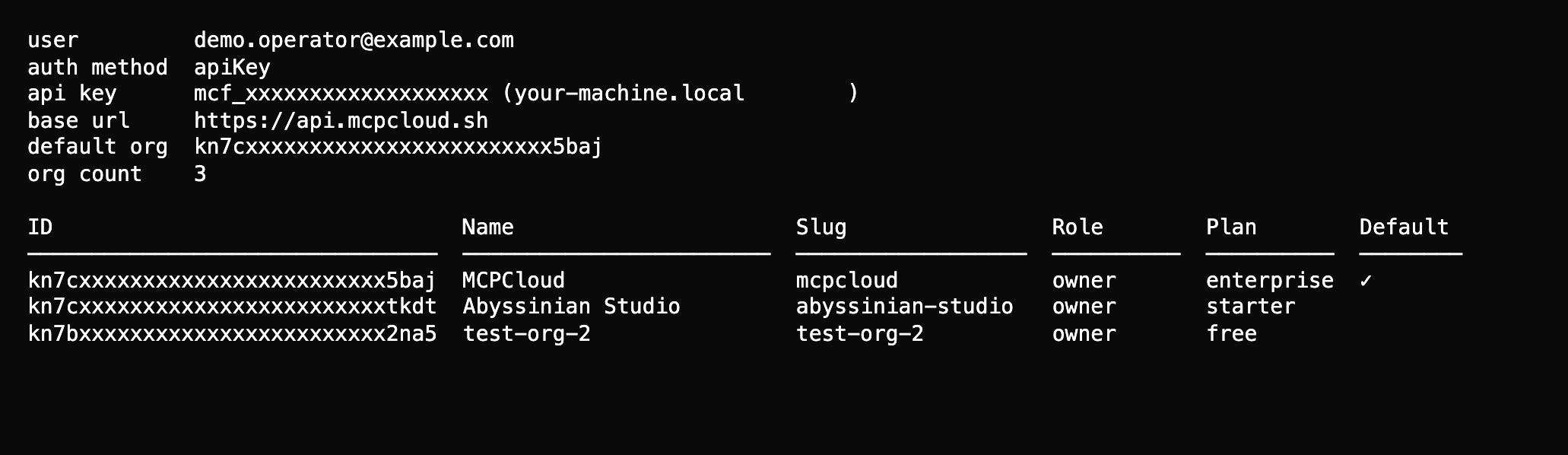
mcp whoami — identity, active key, base URL, and every org you can act on.
Jump to workflow
Command reference
Every command group with real, copy-pasteable output.
Interactive UI & diagnostics
The
mcp ui dashboard and the mcp doctor check.Server workflows
Create, deploy, pause, and inspect server runtime behavior.
Skill workflows
Manage skill publish/install/test lifecycles.
Typical command flow
- Setup
- Build & deploy
- Verify
- Automate